Activation
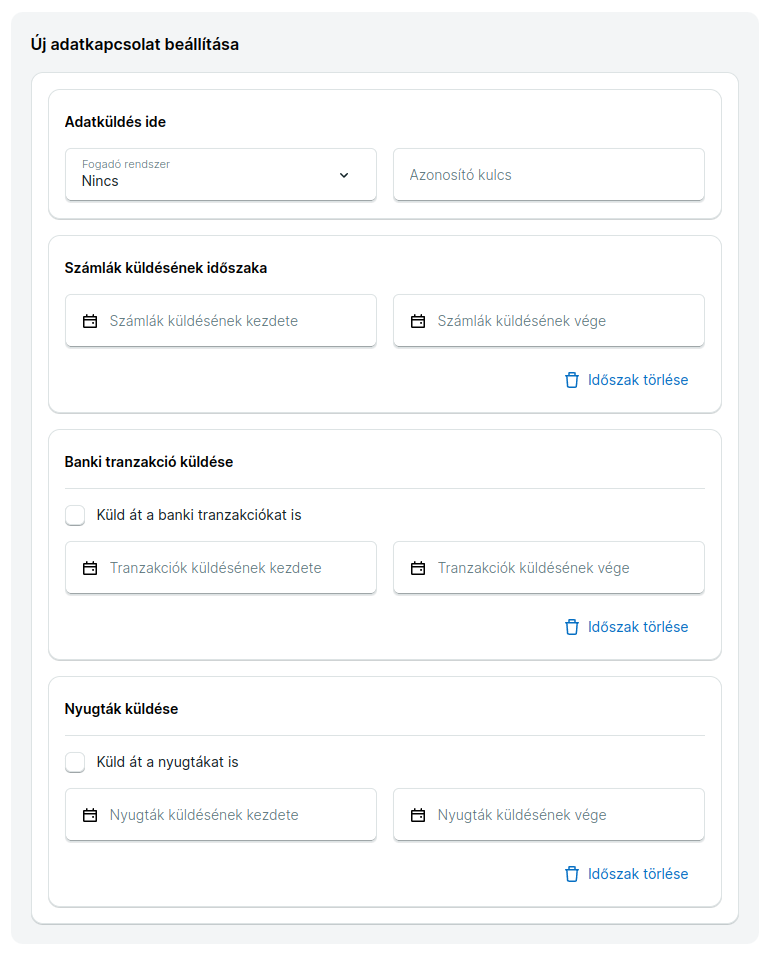
Once Számlázz.hu IT has registered the receiving application, you can link your invoice issuer account to the external system.
Connection steps:
- Select the receiving system from the dropdown list
- Set the identification key
- Specify the start dates for the connection
By setting a start date for data transmission, Számlázz.hu's system will send invoices, receipts, or transactions from that date, even if it's retroactive. Make sure to set the date interval to include today's date to initiate the data flow.
The linking can be managed by the owner, administrator, or accountant of the invoice issuer account in the account settings. For hidden connections, Számlázz.hu IT will handle the setup.
URL Configuration Guide
Számlázz.hu sends all partner data to the receiving system through a single URL - no need for separate URLs for each company.
What you need to know:
- The identifier key is always sent in every data package via the
X-Szamlazzhu-KeyHTTP header - Distribution happens in your system - you decide how to handle different clients' data
- Optionally, the key can be appended to the URL (
addkeytourlsetting)
The identifier key is always sent in the HTTP header (default). Key concatenation (addkeytourl) is a separate function that also appends the key to the URL. Two different things!
Example:
| addkeytourl | Base URL | Key | Actual URL |
|---|---|---|---|
false | https://yoursystem.com/receive/ | abc123xyz | https://yoursystem.com/receive/ |
true | https://yoursystem.com/receive/ | abc123xyz | https://yoursystem.com/receive/abc123xyz |